How to Optimise Images for Faster Websites
Images make websites look professional and engaging, but they can also be one of the biggest reasons a website loads slowly.
Many website owners upload large, unoptimized images without realizing the impact on performance.
A slow website can:
- Frustrate visitors
- Reduce conversions
- Hurt SEO rankings
- Increase bounce rates
The good news is that image optimization is simple and can significantly improve website speed.
In this guide, you’ll learn how to optimise images for faster websites.
❓ Quick Answer: How Do You Optimise Images for a Website?
To optimise images, resize them before uploading, compress file sizes, choose the correct image format, and use modern image formats where possible. Optimised images help websites load faster and improve user experience.
Why Image Optimisation Matters
Images are often the largest files on a website.
Large images can:
- Slow page loading times
- Use more bandwidth
- Affect mobile performance
Faster websites provide a better experience and often perform better in search engines.
[website not loading 10 quick fixes you can try]
How Images Affect Website Speed
When someone visits your website, their browser must download every image on the page.
If images are too large:
- Pages load slowly
- Visitors may leave before the page finishes loading
- Search engines may view the page less favourably
Even a few oversized images can impact performance.
1️⃣ Resize Images Before Uploading
One of the most common mistakes is uploading images that are much larger than necessary.
For example:
- Display size: 780 × 405 pixels
- Uploaded image: 4000 × 3000 pixels
The larger image uses significantly more resources.
Resize images to the size you actually need before uploading.
2️⃣ Compress Images
Compression reduces file size without significantly affecting quality.
Benefits include:
- Faster loading times
- Lower storage usage
- Better performance
Most users will not notice the difference when images are properly compressed.
3️⃣ Choose the Right Image Format
Different image formats serve different purposes.
JPEG
Best for:
- Photographs
- Blog feature images
- General website images
Provides good quality with smaller file sizes.
PNG
Best for:
- Logos
- Graphics with transparency
- Icons
PNG files are usually larger than JPEGs.
WebP
Best for:
- Modern websites
- Faster loading speeds
WebP often provides smaller file sizes while maintaining excellent quality.
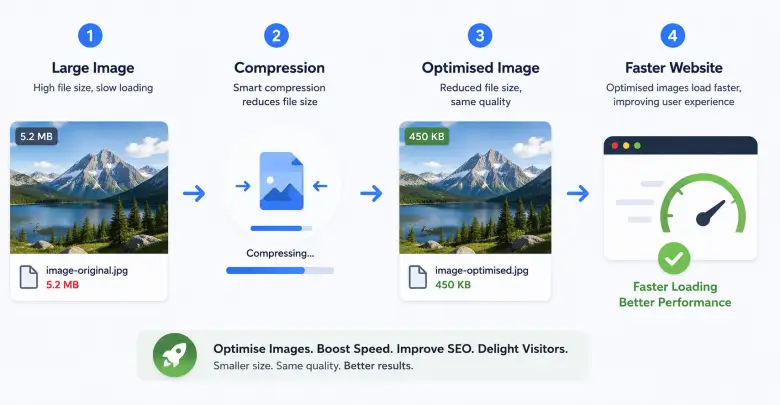
4️⃣ Optimise Feature Images
Feature images often appear at the top of blog posts.
For Hostigo blog articles, a properly sized image helps maintain consistency and performance.
Avoid uploading excessively large feature images when a smaller version will display exactly the same.
5️⃣ Use Image Optimisation Plugins
WordPress plugins can automatically:
- Compress images
- Convert formats
- Improve performance
This saves time and helps maintain consistent optimization.
[essential wordpress plugins for business websites]
6️⃣ Add Descriptive File Names
Before uploading an image:
Avoid:
image123.jpg
Use:
wordpress-dashboard-guide.jpg
Descriptive file names help with organization and may provide SEO benefits.
7️⃣ Use Alt Text
Alt text describes an image to search engines and screen readers.
Good alt text:
- Describes the image accurately
- Includes relevant keywords naturally
Example:
“WordPress dashboard showing website settings”
Alt text improves accessibility and SEO.
[what is website seo and why it matters for your business]
8️⃣ Avoid Uploading Images Directly From Cameras
Modern cameras and smartphones create very large image files.
Before uploading:
- Resize the image
- Compress the image
- Convert to an appropriate format
This can dramatically reduce file sizes.
9️⃣ Optimise Images for Mobile Users
Many South African users browse websites on mobile devices.
Large images can:
- Use more mobile data
- Load slowly on mobile networks
- Create a poor user experience
Mobile optimization is essential.
🔟 Monitor Website Performance
After optimizing images, test your website speed.
Look for:
- Faster page loading
- Improved performance scores
- Better user experience
Regular monitoring helps identify new issues before they become problems.
[how to get more visitors to your website in south africa]
Common Image Optimisation Mistakes
Avoid:
- Uploading huge image files
- Using PNG for every image
- Ignoring compression
- Forgetting alt text
- Uploading images straight from a camera
These mistakes can slow down even well-designed websites.
How Image Optimisation Helps SEO
Image optimisation supports SEO by:
- Improving page speed
- Enhancing user experience
- Reducing bounce rates
- Helping search engines understand content
Fast websites generally perform better in search results.
[seo basics for south african businesses beginner guide]
Final Thoughts
Image optimisation is one of the easiest ways to improve website performance.
By resizing images, compressing files, and choosing the right formats, you can create a faster and more user-friendly website.
Small improvements in image optimization can have a significant impact on website speed and visitor experience.
Ready to Launch Your Website?
Reliable hosting helps keep your website fast, secure, and available for your customers.

Go Live. Go Fast. Go Hostigo. Discover our commitment to delivering hosting that keeps your website performing at its best.
Copyright © 2026 Hostigo PTY Ltd. All Rights Reserved